 By Chunjie Zheng, Technical Director, YK Door Industry · 17 years in fire door engineering · Technically reviewed by Yulin Zhang, General Manager
The short answer: To check a UL listing for a fire door, search UL Product iQ by company name, file number or model, open the product’s category page, and confirm the listing names the door type, rating and size limits you need. Then match the label on the delivered door to that file. Other agencies publish similar directories that work the same way.
A label on a door edge is a claim. The directory entry behind it is the proof. Checking that entry takes a few minutes, and it answers the three questions an inspector will ask anyway: is this product really listed, is it listed for this rating, and does the listing cover this size and configuration? This guide walks through the check in UL Product iQ, explains how to read what you find, and covers the cases where names do not match or a label looks wrong. For where this step sits in the wider process of checking supplier documents, see our guide to verifying what a door’s paperwork proves.
How to check a UL listing for a fire door in five steps
UL Product iQ is UL’s online certification directory. It requires a free account. Once signed in, the search works in five steps.
- Search. Enter the company name, the UL file number from the label or data sheet, or a model number. Lori Greene’s walkthrough shows that a model number search can take you straight to the product, and that adding too much detail sometimes narrows the search too far [1].
- Pick the category. UL groups listings into category codes. Fire doors appear under their own category, and an ICC presentation on protecting openings gives GVTV as the code for fire doors [3]. Hardware, frames and glazing have separate categories.
- Open the listing. The product page shows the listee, the factory locations, the product designations and the ratings.
- Read the limits. Check the maximum sizes, the permitted hardware and glazing, and any notes.
- Save a dated copy. Print or save the page with the date, so the submittal shows what the directory said when you checked.
Clicking a product number or its category code gives more detail [1], and UL’s own guidance for code officials explains how to use the directory to confirm certification [5]. The search itself is quick; the care goes into reading what the listing does and does not cover.
Reading the listing card
A listing card is short, and what it leaves out matters as much as what it says. The listee is the company that holds the listing, which may not be the company selling you the door. The factory locations show where listed production takes place. The product designations name the door types or series covered, and the ratings show the time and test standard, for example UL 10C for positive-pressure testing. Notes often limit the listing to certain frame types, sizes or hardware [5].
If the public entry does not settle a configuration, ask the manufacturer for the construction evidence and confirmation through the listing agency. A listing for single doors does not cover pairs unless pairs are named. A listing that allows glazing up to a stated area does not cover larger lights. These limits are where most problems appear later, at inspection.
Three checks against your door schedule
With the listing open, compare it with the door schedule, opening by opening. First, the rating: the listing must include the rating each opening requires, in the right test standard. Second, the size: each leaf and each pair must be within the listed maximum dimensions. Third, the configuration: hardware type, glazing size and frame type must be within what the listing allows.
When we supply listed doors, we give buyers the listing reference for each door type, and each label number is tied to the door’s own traceability code, so a reviewer can go from the label on site to the directory and to the build record. Our YK-S90 doors are UL 10B/10C listed at 90 minutes for a single leaf and 60 minutes for a double leaf; the testing behind those ratings is explained on our page about UL 10B and UL 10C fire door listings.
From the factory floor
We send the listing file number with the search path in UL Product iQ. After looking it up, reviewers almost always ask whether the file covers their size and hardware, which leads straight to extended application.Chunjie Zheng, Technical Director
When names do not match
The most common confusion is a name mismatch. The door is sold under one brand, the label shows a file number, and the directory lists a different company. This is not necessarily a problem. Private labeling, distributors and parent companies are all normal, and directories often list the manufacturer rather than the seller [2]. What matters is that the directory links the listed product to the factory that made your doors.
When the names differ, ask the seller for a letter or document from the listee confirming the relationship, and check that the factory location on the listing matches where the doors were made. If a trading company is selling doors from an unnamed factory under someone else’s file number, the risk rises sharply, because no one can confirm the doors came from listed production.

Spotting counterfeit labels
Counterfeit fire door labels exist. A university safety alert describes counterfeit fire door labels found in the field and cites a fire door file number as an example of how the mark was misused [4]. Three checks help: the file number on the label exists in the directory, the listee and category match the product, and the label’s format matches what the agency issues. If any check fails, contact the listing agency before accepting the door.
Other directories
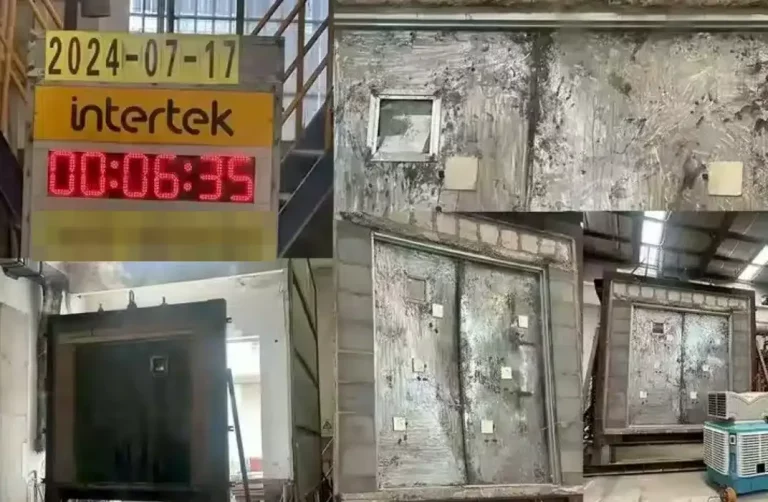
UL is not the only agency. Intertek publishes its Directory of Building Products for WH-listed products, and QAI publishes its own online listings; they follow the same logic of listee, product, rating and limits [2]. Our YK-S90 doors are also WH (Intertek) listed, so the same check can be done in the Intertek directory.
What a listing does not tell you
A listing answers one question: did this product family come from production that the agency controls, within stated limits? It does not tell you whether the door on site was installed correctly, whether the hardware fitted later is permitted, or whether someone has drilled the leaf for a new lock. Those questions belong to NFPA 80 and to the inspection at handover. UL’s application guide for doors, windows and hardware explains how listed doors, frames and hardware are meant to be combined, and how the leaf, frame, glazing and hardware evidence fits together, with ordinary leaf hinges of the permitted type as a recognized exception to separate listing [6]. A door can be perfectly listed and still fail inspection because of an unlisted closer or an oversized hole.
When the label itself is missing or painted over, the listing does not help on its own. The remedy is field labeling: the agency sends an inspector to confirm the construction and, if satisfied, labels the door in place [7]. That costs time and money, so protecting labels during painting and installation is part of protecting the listing.
A worked example: checking a 90-minute pair
Suppose the door schedule calls for a pair of steel doors, 90 minutes, 2,000 × 2,400 mm overall, with a vision panel. The supplier sends a file number. In Product iQ, you search the file number, open the listing for steel fire doors and read the card. First, the manufacturer: does the company name match the proforma invoice? Second, the rating: is 90 minutes listed for pairs, or only for single leaves? Many listings give a lower rating for pairs than for singles. Third, the size: is 2,000 × 2,400 mm inside the maximum for pairs? Fourth, the glazing: does the listing allow vision panels at 90 minutes, and of what size and glass type?
If any answer is no, the listing does not cover your door, however genuine it is. The supplier then has to show another listing, an oversize procedure or a different configuration. Recording each answer next to the schedule line turns a vague “UL listed” into four checked facts.
Keeping the evidence for the inspector
Directory pages change as listings are updated, extended or withdrawn. Save the listing card as a PDF or screenshot with the date, the file number and the URL, and attach it to the submittal for each door type. Certification directories exist precisely so that code officials and designers can confirm a product’s status themselves [2], and an inspector who sees a dated copy alongside the label can confirm the match quickly.
Mistakes when checking listings
The commonest mistake is checking that a file number exists without reading what it covers. A second is reading the single-leaf rating and assuming the pair has the same. A third is overlooking the hardware: the door may be listed, but only with hardware that is itself listed for fire doors. A fourth is checking once at tender and never again, although a listing can be revised between tender and delivery. Save a dated copy of the listing page with your submittal. Directories change, and the saved page shows what you checked and when. Save the entry with the date you checked it.
Frequently asked questions
Is UL Product iQ free to use?
The directory is open to designers, code officials and buyers; UL may ask users to register before searching [1]. Registration takes a few minutes and is worth doing before the first submittal review.
Is a listing the same as a test report?
No. The test report records one test, while the listing confirms that production is controlled and inspected within stated limits. US code compliance for fire doors normally rests on the listing and label.
What if my door is larger than the listing allows?
Ask the manufacturer how oversize doors are handled under its listing. Agencies have procedures for oversize doors, often with a certificate instead of a full label, and acceptance rests with the authority having jurisdiction.
How often should I recheck a listing?
Check at tender, at order and before shipment. Listings are revised, and a quick search costs less than a rejected door.
Is a cUL mark the same as a UL mark?
The cUL mark shows that the product is listed for the Canadian market to Canadian standards such as CAN/ULC-S104. For a US project, check the required US listing and mark; for Canada, check certification to the Canadian standard with an accepted mark.
Listings for frames, hardware and glass
A fire door assembly is listed in parts. The leaf, the frame, the hinges, the latch, the closer and the glass each carry their own listing and, usually, their own label, and the complete combination must be authorized for the rating the opening needs. When you check a listing, check the frame and hardware too. A 90-minute leaf in a 60-minute frame does not give a 90-minute opening, and a leaf listed only with certain hinges is not covered with others. Hardware schedules that name listed products by model make this check quick; schedules that say “fire-rated hardware” leave it to the inspector.
Glass in fire doors is listed separately, by type and size, for each rating. The door listing states the maximum glazed area and the glass types allowed, and the glass listing states the doors and ratings it is tested with. Both must agree before the opening is accepted.
Save the directory page into the submittal
Save the directory page for each door type into the submittal, next to the product data. If you are still deciding which evidence words to require, see listed, tested to or certified, and for a way to map every specification clause to its evidence, see building an evidence index.
Sources
- Lori Greene, Learn About UL’s Product iQ, iDigHardware, 10 July 2023. https://idighardware.com/2023/07/learn-about-uls-product-iq/
- Lori Greene, Certified Product Directories, iDigHardware, April 2014. https://idighardware.com/2014/04/certified-product-directories/
- International Code Council, Session 108: Protect Your Openings (presentation). https://www.iccsafe.org/wp-content/uploads/Session-108-Protect-Your-Openings.pdf
- University of Rochester Environmental Health & Safety, safety alert on counterfeit fire door labels. https://www.safety.rochester.edu/fire/safetyalerts/pdf/CounterfeitFireDoors.pdf
- UL resources for code officials and design professionals (State of Connecticut DAS copy). https://portal.ct.gov/-/media/das/oedm/design-and-trades/ul_resources_for_code_officials__design_prof.pdf
- UL Solutions, Doors, Windows and Related Hardware Application Guide. https://www.ul.com/thecodeauthority/knowledge/ul-fire-rated-doors-guide
- Lori Greene, Field Labeling of Fire Doors and Frames, iDigHardware, September 2015. https://idighardware.com/2015/09/field-labeling-of-fire-doors-and-frames/